Library
Private shops
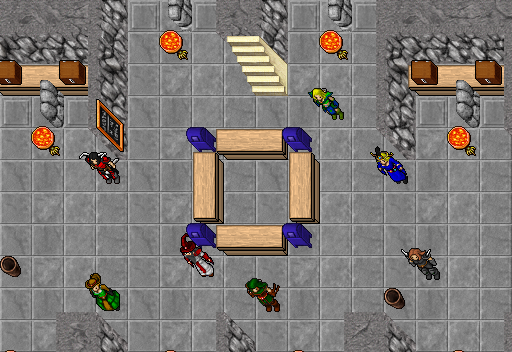
Log out and keep trading. Your character stays standing in a depot as a shop, with a sign over its head, and sells the items from your backpack to anyone who walks by, day and night, while you are offline. The gold goes straight to your bank.
 LEGENDARY DRAGON
GEARRUNES AND POTIONS,
CHEAP!RARE BACKPACKSUPGRADED +5 BOWSORE, WOOD AND HIDES
The private store document

Buy the document in the store for 20 coins. It arrives in your backpack as an ordinary item: use it, keep it for later or sell it to another player.
- Use itUsing the document gives that character 48 hours in which it may run a shop. The clock starts when you use it, not when you buy it, and runs whether your shop is open or not.
- Use anotherUse a second document while the first still runs, and another 48 hours are added on top.
- Free on RookgaardOn Rookgaard you need no document at all: open your shop in the temple.
Opening your shop
Three steps, and your character is a shop.
- 1Find a spotWalk into a depot hall, or the temple on Rookgaard, and stand on a free tile that isn't on or next to a locker, a door or stairs, and doesn't block anyone's way.
- 2Open shopRight-click your character and choose Open shop. Drag items in from your backpack and its bags, set a price per unit from 1 to 10,000,000 gold, and write up to 40 characters for the sign over your head.
- 3Start shopPress Start shop: your listed items are locked and your character stands still. Press Leave shop, or simply log out, and the shop keeps selling.
Buying from a shop
Legendary armour, epic boots, buff potions, the rarest ore and hides: whatever players find, someone puts up for sale.
 Magic Plate Armor
 Boots of Haste
 Demon Shield
 Berserk Potion
 Cobalt Ore
 Hydra Head
- Right-click a shop and choose Browse shop, or just use it. The window lists every item with its own look text, so you see its rarity, upgrades, coating and charges before you pay, along with the price per unit and how many are left.
- You pay as you would at an NPC: from the gold you carry first, then from your bank. The item goes straight into your backpack.
- If you lack the gold, the capacity or the room, the buy is refused before any gold moves.
The fee
Each sale pays a small fee, taken from the price. The rest goes into the seller's bank at once, online or not.
- Free account10%Sell for 100,000 gold: 10,000 gold fee, 90,000 gold in your bank.
- Premium account5%Sell for 100,000 gold: 5,000 gold fee, 95,000 gold in your bank.
- The History button in your shop window lists every sale: when, to whom, what, how many and the fee.
- Shops on Rookgaard pay the same fee. Fees are rounded down.
Where shops open
Every town's depot has room for shops, on every floor and in every hall. Rookgaard has no depot, so its shops open in the temple.
- Thais
- Carlin
- Venore
- Ab'Dendriel
- Kazordoon
- Liberty BayPremium
- Port HopePremium
- AnkrahmunPremium
- DarashiaPremium
- EdronPremium
- SvargrondPremium
- VeldhavenPremium
- Rookgaard temple
- A shop can't stand on or next to a locker, a door or stairs, or anywhere it would cut a locker or the way out off from the rest of the hall. Other shops count too, so even a crowded hall keeps a way through.
- Each account can have one open shop at a time.
When a shop closes
A shop sells until one of these happens. Then it closes and the character leaves the game with whatever is left.
- Sold outThe last item has been bought.
- 48 hoursEach opening lasts at most 48 hours, and a shop also closes when its character's document time runs out. With time left, open it again at once.
- You come backLog the character in and the shop keeps selling, with its window open. Press Stop shop to walk away or change something: your list and prices stay, ready to start again, and Clear list gives you your items back.
- Server saveShops stay open through the daily server save and stand in the same place afterwards. Their time keeps running while the server is down.
Small print
All the rules
- A shop holds up to 100 items. A stack counts as one, and you may list only part of a stack.
- Items come only from your backpack and the bags in it. A bag or backpack sells with everything in it as one listing, so runes sell by the backpack, and buyers see every item in it. Take any money out of it first.
- If you set a price below what an NPC would pay for the item, the shop window asks you to confirm it.
- Stop shop closes your shop and keeps you in the game with your list and prices. Clear list takes everything off it.
- A shop can't be pushed, attacked or traded with.
- Characters of your own account can't buy from your shop.